

What it does
Construction handover data has a habit of living everywhere except where it is needed: inboxes, shared drives, USB sticks and a subcontractor's laptop that left site three months ago. Procom replaces that sprawl with a single structured platform where every manual, certificate, drawing, and data sheet lives in a tree that mirrors the deliverable it belongs to.
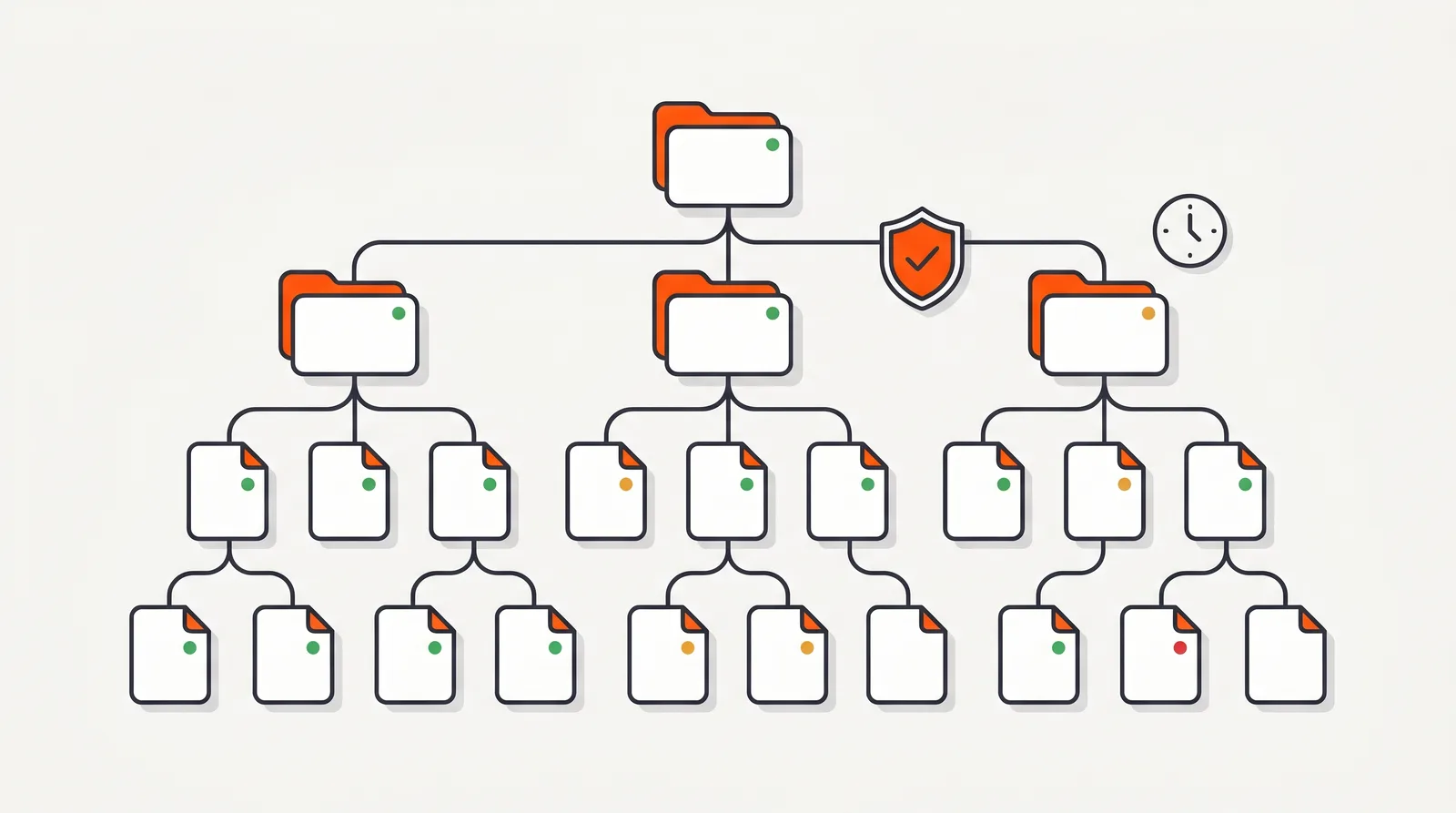
Every node in the tree carries a visual status, so a project manager sees the entire handover at a glance: which sections are complete, which are in review, and which subcontractors are holding things up. Manual folders carry due dates, and a Red–Amber–Green traffic-light system flags anything drifting towards a deadline. Subcontractors are assigned the sections they own and work in their own scoped portal. They see their obligations, not the whole project.
Underneath, the platform does the unglamorous work that keeps government and Defence reviewers happy: every upload is virus-scanned with ClamAV, PDFs are optimised through compression and flattening, files are version-controlled with permissions and usage tracked, and every action is logged through the Activities system. When the manual is ready, it exports to PDF, DOCX, LaTeX, HTML, or XLS.
How it works
Structure
Start from a proven template or build your own tree with the drag-and-drop interface. Assign each section to the subcontractor responsible for it, set due dates on manual folders, and the traffic-light indicators take over from there.
Collect
Subcontractors upload through their own portal. Every file is virus-scanned with ClamAV on arrival, PDFs are compressed and flattened, and file validation warns about problems before they reach review. New subcontractors and field workers can onboard by scanning a QR code on site, using signed, encrypted access links with three onboarding paths, including registration that auto-assigns them to their section.
Control
Review and approve through configurable workflows, with comments attached to the documents they relate to. Versions are kept, permissions enforced, and the Activities system logs every change: uploads, approvals, rejections, edits.
One structured tree, every deliverable tracked
Why it matters
Handover documentation fails for boring reasons: a missing warranty certificate, an unsigned commissioning record, a file someone swore they emailed. On a government or Defence project, those gaps surface during review, when fixing them is slowest and most expensive, and when the final claim is waiting on acceptance.
Structured data management removes the failure mode. Because every deliverable is a node with an owner, a status, and a due date, gaps are visible months before Practical Completion instead of days after it. Because every action is logged, disputes about who uploaded what and when are settled by the audit trail, not by memory.
And because the data is structured rather than buried in a 4 GB PDF, it keeps working after handover. The facility manager navigates the same tree, the warranty data feeds the Defects Liability Period, and the asset data flows into the owner's systems.
Compared to
| Task | Email + shared drives | Procom |
|---|---|---|
| Knowing what is missing | Cross-reference a spreadsheet against folder contents by hand. | Every node shows its status; traffic lights flag overdue sections automatically. |
| Chasing subcontractors | Reminder emails, phone calls, and hope. | Each subcontractor sees their own outstanding sections and due dates in their portal. |
| File safety | Whatever arrives, arrives, malware included. | ClamAV virus scan on every upload; PDF optimisation; file validation warnings. |
| Review feedback | Comments in email threads, detached from the document. | Integrated commenting on the node itself; rejection reasons travel with the file. |
| Proving what happened | Reconstruct events from sent folders. | The Activities system logs every upload, status change, and approval with who and when. |
| Final compilation | Weeks of copy-paste assembly at the worst possible time. | Export the approved tree to PDF, DOCX, LaTeX, HTML or XLS on demand. |
Specifications
Structure
Tree-based manual structure with drag-and-drop organisation, real-time preview of changes, and per-node visual status tracking.
Due dates & status
Manual folders carry settable, updatable, clearable due dates. Nodes display Red, Amber or Green traffic-light indicators based on those dates.
File safety
Automatic ClamAV virus scanning on upload, PDF optimisation (compression and flattening), and file validation with warnings. Accounts support two-factor authentication and Microsoft / Google single sign-on.
Version control
Files are version-controlled with per-file permissions and usage tracking, so superseded revisions never sneak into the compiled manual.
Audit trail
Full audit logging via the Activities system: every upload, status change, approval, rejection and comment recorded with actor and timestamp.
Export formats
Compiled manuals export to PDF, DOCX, LaTeX, HTML and XLS. Exports can target specific folders, flatten the folder structure or skip empty folders, and every export is kept in a history with download links. Offline viewing is supported for site conditions without connectivity.
Frequently Asked Questions
What file types and export formats does Procom support?
Subcontractors upload their native documents: PDFs, drawings, manufacturer literature, spreadsheets, images. Compiled manuals export to PDF, DOCX, LaTeX, HTML and XLS, so the same structured data serves Defence submissions, client handovers and facility management imports.
How is uploaded documentation kept safe?
Every file is automatically virus-scanned on upload using ClamAV before it enters the project. PDFs are optimised, compressed and flattened, so the compiled manual stays within submission size limits without manual rework.
Who can see and edit what?
Access is role-scoped. Subcontractors work in their own portal and only see the sections assigned to them. Project managers see the whole tree with per-section status. Clients and reviewers get review access without edit rights. File permissions and usage are tracked per file.
Does Procom keep a history of changes?
Yes. Files are version-controlled, and every action (uploads, status changes, approvals, comments) is logged through the platform's Activities system. The result is a complete audit trail you can stand behind in a government or Defence review.
How do I know which sections are falling behind?
Manual folders carry due dates, and every node displays a Red, Amber, or Green traffic-light indicator based on those dates. Project managers see at a glance which subcontractors are on track and which sections need chasing.
Can teams discuss documents inside the platform?
Yes. Procom has an integrated commenting system, so review feedback, rejection reasons and clarifications live next to the document they relate to, not in a separate email thread that gets lost before handover.
Ready to get your handover data under control?
Book a walkthrough on a sample project, or talk to us about the documentation you are wrangling right now.